
Temperature sensors are widely used in industrial automation, process control, medical equipment, and household applications. They play an important role in monitoring and controlling temperature in various systems.
However, temperature sensors may experience inaccurate readings, unstable signals, or complete failure due to electrical problems, environmental conditions, improper installation, or aging components.
Understanding the common causes of temperature sensor failure and how to troubleshoot them can help engineers quickly identify problems and reduce equipment downtime.
Common Symptoms of Temperature Sensor Failure
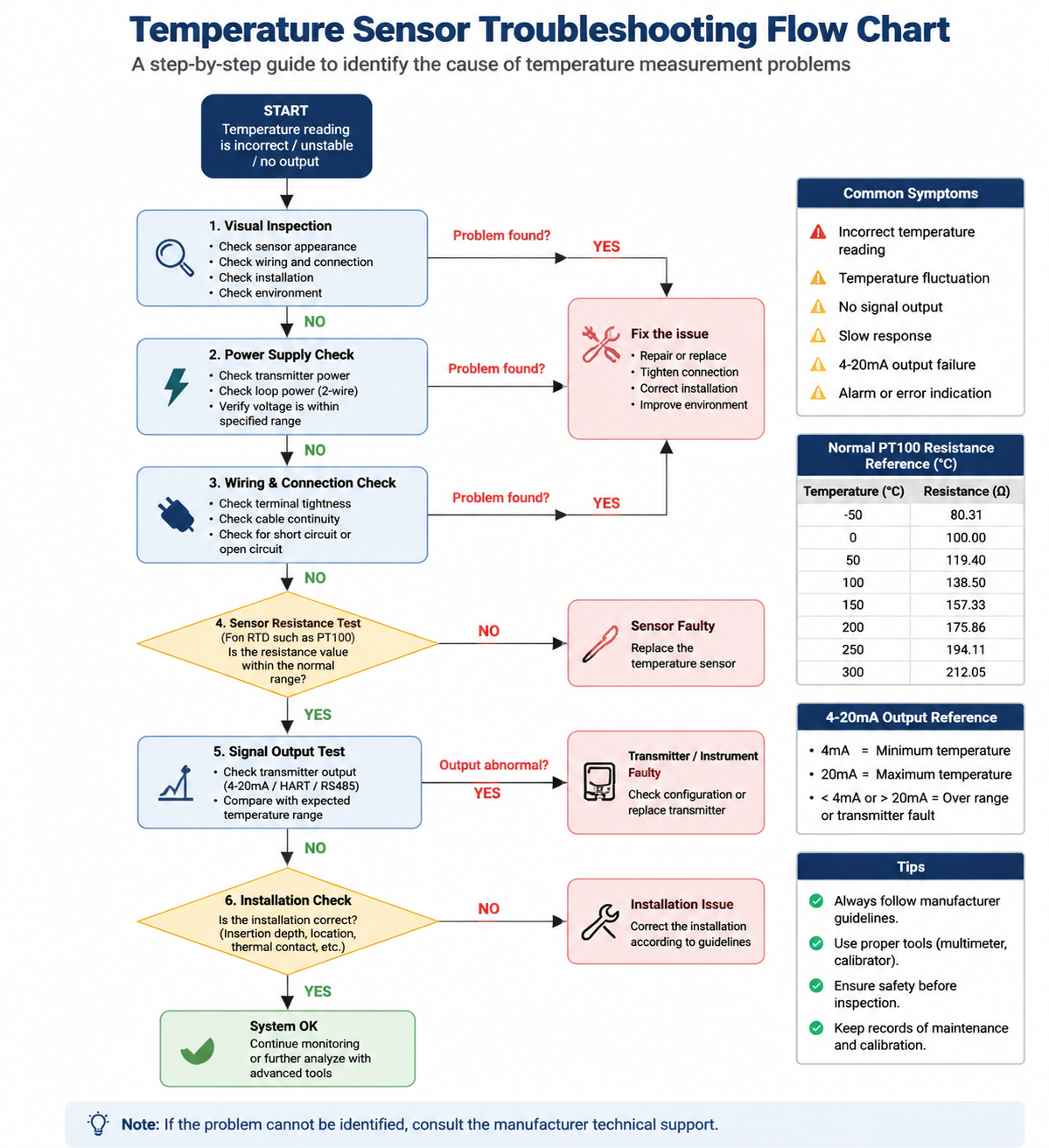
Before troubleshooting, it is important to identify the failure symptoms. Common problems include:
- Incorrect temperature readings
- Temperature display fluctuation
- No signal output
- Slow response time
- 4-20mA output failure from temperature transmitters
- Alarm or error indication from the control system
1. Sensor Damage or Aging
Physical damage, long-term operation, or excessive temperature exposure can cause the sensor element to fail.
Common causes include:
- Cracked sensor protection tube
- Corrosion of the sensing element
- Mechanical impact during installation
- Long-term operation beyond the rated temperature range
Trouhooting method:
Inspect the sensor appearance carefully. Check for cracks, deformation, corrosion, or damage to the probe. If the sensing element is damaged, replacement is usually required.
2. Wiring Problems
Incorrect wiring is one of the most common causes of temperature measurement failure.
Possible problems include:
- Loose terminal connections
- Broken cables
- Short circuits
- Incorrect wiring configuration
For RTD sensors such as PT100, incorrect connection of 2-wire, 3-wire, or 4-wire configurations can cause measurement errors.
Troubleshooting method:
- Check all terminal connections
- Inspect cable conditions
- Use a multimeter to test continuity and resistance values
- Confirm wiring according to the sensor wiring diagram

3. Electrical Interference and Signal Noise
In industrial environments, temperature signals may be affected by electromagnetic interference (EMI) from motors, frequency converters, power cables, and other electrical equipment.
Symptoms include:
- Unstable temperature readings
- Signal fluctuation
- Incorrect control system input
Troubleshooting method:
- Check whether shielded cables are used
- Ensure proper grounding
- Separate sensor cables from high-power cables
- Install signal filters if necessary
4. Environmental Conditions
The operating environment has a significant impact on temperature sensor performance.
Common environmental factors include:
- Excessive temperature
- High humidity
- Chemical corrosion
- Strong vibration
Troubleshooting method:
Make sure the sensor is operated within its specified temperature, pressure, and environmental limits.
For harsh applications, select suitable protection materials such as stainless steel protection tubes or corrosion-resistant sensor materials.
5. Calibration Drift
After long-term operation, temperature sensors may develop measurement deviation due to aging or changes in sensor characteristics.
This may result in:
- Incorrect temperature display
- Difference between actual temperature and measured temperature
Troubleshooting method:
Regular calibration should be performed using a standard temperature source.
Compare the sensor output with a reference temperature and adjust or replace the sensor if the deviation exceeds the acceptable range.
6. Power Supply Problems
For temperature transmitters and smart temperature sensors, unstable power supply can cause abnormal operation.
Possible causes include:
- Insufficient supply voltage
- Voltage fluctuation
- Incorrect power connection
Troubleshooting method:
Check whether the power supply matches the transmitter requirements.
For 2-wire temperature transmitters, verify that the loop power supply is stable and within the specified range.
7. Temperature Transmitter or Control System Failure
Sometimes the sensor itself is working correctly, but the connected instrument or control system has problems.
Possible causes include:
- Faulty temperature transmitter
- Incorrect parameter settings
- PLC/DCS input problems
- Software configuration errors
Troubleshooting method:
Check the transmitter output signal and control system input.
For 4-20mA temperature transmitters:
- 4mA normally represents the minimum temperature range
- 20mA normally represents the maximum temperature range
Abnormal output signals may indicate sensor, transmitter, or configuration problems.
8. Incorrect Installation
Improper installation can affect measurement accuracy and response time.
Common installation mistakes include:
- Insufficient insertion depth
- Installation in areas with strong airflow
- Poor contact between sensor and measured medium
- Incorrect installation location
Troubleshooting method:
Ensure the sensor is installed according to manufacturer recommendations.
The sensing element should be positioned correctly to obtain accurate temperature measurement and avoid areas with large temperature gradients.
How to Test a Temperature Sensor
A basic troubleshooting process includes:
1. Visual Inspection
Check:
- Sensor appearance
- Cable condition
- Terminal connections
- Protection tube condition
2. Resistance Measurement
For RTD sensors such as PT100:
- Measure the resistance value using a multimeter
- Compare the value with the standard resistance-temperature table
- Check whether the resistance changes smoothly with temperature variation
3. Signal Output Test
For temperature transmitters:
- Check the 4-20mA output signal
- Verify communication signals such as HART or RS485 if applicable
Preventive Maintenance Tips
To reduce temperature sensor failures:
- Perform regular inspection and calibration
- Select the correct sensor type for each application
- Use suitable materials for corrosive or high-temperature environments
- Follow manufacturer installation guidelines
- Protect cables from mechanical damage and electrical interference

Conclusion
Temperature sensor failures can be caused by many factors, including sensor damage, wiring problems, electrical interference, environmental conditions, calibration drift, power supply issues, and installation errors.
A systematic troubleshooting approach — from hardware inspection to signal verification — helps engineers quickly identify the root cause and restore reliable temperature measurement.
Choosing the correct temperature sensor type, installation method, and maintenance strategy is essential for long-term industrial measurement reliability.